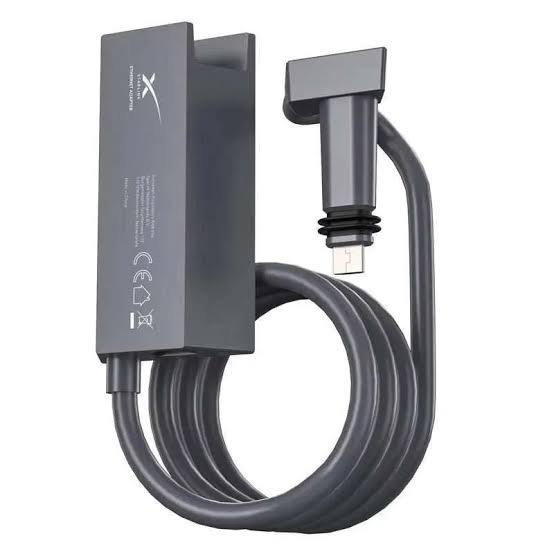
Starlink Ethernet Adapter Kenya – Ultra-Detailed Wired Networking, Gen 2 Setup & Router Integration Guide 2026 The Starlink Ethernet Adapter is an essential accessory for users who want to connect wired devices directly to a Starlink network. It is...
The Starlink Ethernet Adapter is an essential accessory for users who want to connect wired devices directly to a Starlink network. It is especially important for Starlink Standard Actuated Gen 2 users because the Gen 2 router does not provide a built-in Ethernet LAN port in the same way newer Gen 3 routers do.
With the Ethernet Adapter, users can connect:
office routers
CCTV systems
desktop computers
smart TVs
gaming consoles
network switches
access points
POS systems
third-party routers
structured office networks
The adapter is commonly installed between the Starlink dish cable and the Starlink router, creating a wired Ethernet output for stable LAN connectivity. Kenyan listings describe the adapter as supporting Gigabit Ethernet up to 1Gbps, with plug-and-play setup for wired internet connections.
For users upgrading to Gen 3 Router, Starlink notes that Gen 2 users need an Ethernet adapter when using bypass mode or third-party router setups.
| Adapter Type | Estimated Kenya Price | Best Use |
|---|---|---|
| Basic Starlink Ethernet Adapter | KSh 6,500 – 8,000 | Home wired connection |
| Official Gen 2 Ethernet Adapter | KSh 7,500 – 15,000 | Reliable Gen 2 setup |
| Ethernet Adapter + Setup Support | KSh 15,000 – 25,000 | Home/office configuration |
| Ethernet Adapter + Network Switch | KSh 20,000 – 60,000 | Multiple wired devices |
| Full Office Networking Package | KSh 50,000 – 300,000+ | Offices, CCTV, access points |
Kenyan listings show Starlink Ethernet Adapter prices from around KSh 6,500, KSh 7,500, and KSh 14,999 – 15,000, depending on seller, availability, and whether shipping or handling is included.
| Component | Basic Home Setup | Office Setup | CCTV / Business Setup |
|---|---|---|---|
| Starlink Ethernet Adapter | KSh 7,500 – 15,000 | KSh 10,000 – 15,000 | KSh 10,000 – 15,000 |
| Ethernet Cable | KSh 1,000 – 5,000 | KSh 5,000 – 20,000 | KSh 10,000 – 50,000 |
| Network Switch | Optional | KSh 5,000 – 50,000 | KSh 10,000 – 100,000 |
| Third-Party Router | Optional | KSh 10,000 – 80,000 | KSh 20,000 – 150,000 |
| Access Points | Optional | KSh 15,000 – 150,000 | KSh 30,000 – 300,000 |
| Installation Labour | Optional | KSh 10,000 – 50,000 | KSh 20,000 – 100,000 |
| Estimated Total | KSh 8,500 – 20,000 | KSh 40,000 – 365,000 | KSh 100,000 – 715,000 |
| Problem Without Ethernet Adapter | Result | Ethernet Adapter Benefit |
|---|---|---|
| No wired LAN port | Wi-Fi-only setup | Wired connection enabled |
| Weak Wi-Fi in offices | Poor coverage | Connect access points |
| CCTV instability | Dropped feeds | Stable wired link |
| Gaming latency | Higher lag | Lower-latency wired option |
| Router integration issues | Limited control | Third-party router support |
| Buyer Type | Suitability |
|---|---|
| Starlink Gen 2 users | Excellent |
| CCTV users | Excellent |
| Office networks | Excellent |
| Gamers | Excellent |
| Smart TV users | Excellent |
| POS system users | Excellent |
| Starlink Gen 3 users | Usually not necessary |
| Starlink Mini users | Use Mini-specific Ethernet options |
The Starlink Ethernet Adapter is most valuable for Gen 2 users who need wired networking, third-party router integration, CCTV support, or more reliable office connectivity.
| Specification | Details |
|---|---|
| Product Type | Ethernet Adapter |
| Main Compatibility | Starlink Gen 2 / Standard Actuated |
| Hardware Interface | Ethernet |
| Data Link Protocol | IEEE 802.3 Ethernet |
| Data Transfer Rate | Up to 1Gbps |
| Installation Position | Between Starlink antenna cable and router |
| Best Use | Wired LAN, switches, routers, CCTV, access points |
| Indoor Use | Yes |
Kenyan and installer listings describe the adapter as supporting IEEE 802.3 Ethernet, up to 1Gbps data transfer, and installation between the Starlink antenna and router.
| Specification | Details |
|---|---|
| Package Dimensions | Approx. 6.5" × 4.5" × 1.5" |
| Package Weight | Approx. 0.15kg |
| Colour | Black |
| Port Type | RJ45 Ethernet |
| Tools Needed | None |
Installer listings state package dimensions of about 6.5" × 4.5" × 1.5" and package weight of about 0.15kg.
| Starlink System | Compatibility |
|---|---|
| Standard Actuated Gen 2 | Yes |
| Gen 2 Router | Yes |
| Gen 2 Mesh Router | Yes, for LAN device connection |
| Standard Gen 3 Router | Usually not needed |
| Starlink Mini | No, different accessories |
| Enterprise / Performance with native Ethernet | Usually not needed |
DISHYtech notes that the Ethernet Adapter is compatible with Gen 2 and Gen 2 Mesh Routers, while Starlink’s third-party-router guidance notes that bypass mode is usually not required for systems with native Ethernet, such as Enterprise and newer Performance systems.
| Feature | Gen 2 + Ethernet Adapter | Gen 3 Router Built-In Ethernet |
|---|---|---|
| Ethernet availability | Adapter required | Built-in |
| LAN ports | One adapter port | Two LAN ports |
| Setup | Adapter inserted inline | Direct connection |
| Best for | Gen 2 users | Gen 3 users |
| Third-party router use | Supported with setup | Easier |
Starlink’s Gen 3 specifications list two latching Ethernet LAN ports, while Gen 2 users need an Ethernet adapter for wired setups.
The Ethernet Adapter is mainly a Gen 2 networking accessory. Gen 3 users usually already have built-in Ethernet ports.
| Home Device | Why Ethernet Helps |
|---|---|
| Smart TV | More stable streaming |
| Gaming console | Lower latency |
| Desktop computer | Faster wired connection |
| NAS storage | Stable file access |
| Wi-Fi access point | Better home coverage |
| Office Need | Ethernet Adapter Benefit |
|---|---|
| Office router | Better network control |
| Network switch | Connect multiple wired devices |
| Access points | Wider Wi-Fi coverage |
| POS systems | Stable transactions |
| Printers | Reliable shared printing |
| CCTV Requirement | Benefit |
|---|---|
| NVR connection | Stable video recording |
| Remote viewing | More reliable connection |
| Multiple cameras | Switch support |
| Outdoor APs | Better camera coverage |
| Lower packet loss | Better video stability |
| Business Type | Suitability |
|---|---|
| Shops | Excellent |
| Offices | Excellent |
| Hotels | Excellent |
| Lodges | Excellent |
| Schools | Excellent |
| Clinics | Excellent |
| Farms | Excellent |
The Ethernet Adapter turns Starlink from a basic Wi-Fi-only home setup into a more flexible wired networking solution for homes, businesses, CCTV, and offices.
| Step | Action |
|---|---|
| 1 | Power off Starlink router |
| 2 | Disconnect Starlink cable from router |
| 3 | Connect Starlink cable into Ethernet Adapter |
| 4 | Connect adapter output to Starlink router |
| 5 | Plug Ethernet cable into adapter port |
| 6 | Connect wired device, switch, or router |
| 7 | Power Starlink back on |
| 8 | Test wired connection |
| Step | Action |
|---|---|
| 1 | Install Ethernet Adapter |
| 2 | Connect adapter to third-party router WAN port |
| 3 | Open Starlink app |
| 4 | Enable bypass mode if needed |
| 5 | Configure third-party router Wi-Fi |
| 6 | Test internet and LAN devices |
Starlink says bypass mode can be enabled in the Starlink app through Settings > Bypass Mode > Enable, while Router 3 setup guidance also notes that Gen 2 users can enable bypass mode so Router 3 acts as the new main router.
| Tool / Item | Purpose |
|---|---|
| Ethernet Adapter | Creates LAN port |
| Ethernet cable | Connects device/router/switch |
| Network switch | Adds multiple LAN ports |
| Third-party router | Advanced network control |
| Starlink app | Bypass mode and settings |
| Cable clips | Clean routing |
| Mistake | Result |
|---|---|
| Using adapter with incompatible kit | No connection |
| Forgetting to reboot router | Connection may not appear |
| Wrong router WAN/LAN port | No internet |
| Enabling bypass accidentally | Starlink Wi-Fi disabled |
| No network switch for multiple devices | Only one wired device |
The Ethernet Adapter is simple to install, but third-party router and bypass-mode setups require careful configuration to avoid disabling Wi-Fi or losing access.
| Feature | Result |
|---|---|
| Starlink router Wi-Fi | Disabled |
| Third-party router | Becomes main router |
| Advanced settings | Managed by third-party router |
| Mesh setup | Changes depending on router |
| Reversal | Requires factory reset if needed |
Starlink explains that bypass mode disables Starlink router Wi-Fi and can be exited by factory resetting the router.
| Scenario | Use Bypass Mode? |
|---|---|
| Using one wired TV | No |
| Connecting a network switch | Usually no |
| Using third-party router as main router | Yes |
| Advanced office network | Yes |
| Mesh with Starlink router still active | Usually no |
| Benefit | Why It Matters |
|---|---|
| Better Wi-Fi coverage | Stronger access points |
| VLAN support | Office segmentation |
| Firewall controls | Better security |
| VPN support | Remote access |
| Bandwidth controls | Better user management |
| Office Setup | Recommended Add-On |
|---|---|
| 5–10 users | Ethernet Adapter + router |
| 10–30 users | Adapter + router + switch |
| 30–60 users | Router + managed switch + APs |
| 60+ users | Professional network design |
Bypass mode and third-party routers are best for users who need advanced networking, larger Wi-Fi coverage, CCTV integration, or office-grade control.
| Problem | Likely Cause | Solution |
|---|---|---|
| No wired internet | Wrong cable connection | Reconnect adapter |
| Wi-Fi disappeared | Bypass mode enabled | Use third-party router or reset |
| Device not getting IP | Router/switch issue | Restart network |
| Slow wired speed | Cable/router limitation | Use quality Ethernet cable |
| CCTV unstable | Weak switch/router | Upgrade network hardware |
| Maintenance Practice | Benefit |
|---|---|
| Keep adapter indoors | Longer lifespan |
| Avoid water exposure | Prevents damage |
| Protect cables from bending | Better connection |
| Label cables | Easier troubleshooting |
| Use quality Ethernet cables | Better speed stability |
Starlink installer listings specify the Ethernet Adapter is for indoor use only, so it should not be exposed directly to rain or outdoor weather.
| Factor | Impact |
|---|---|
| Ethernet cable quality | Affects LAN speed |
| Network switch capacity | Affects multiple devices |
| Router performance | Affects office network |
| Starlink plan/network load | Affects internet speed |
| Device capability | Affects final performance |
| Situation | Why Help Matters |
|---|---|
| Office network setup | Avoids configuration errors |
| CCTV integration | Ensures stable feeds |
| Bypass mode confusion | Prevents lockouts |
| Large Wi-Fi coverage | Requires planning |
| Router migration | Avoids downtime |
Most Ethernet Adapter issues come from incorrect wiring, bypass-mode confusion, poor cables, or weak third-party networking equipment.
When buying a Starlink Ethernet Adapter, many users assume the adapter alone will solve every networking problem. In reality, the adapter only gives you a wired Ethernet port. To build a reliable network, you may still need the right Ethernet cable, switch, router, access point, CCTV connection, bypass-mode setup, and proper cable routing.
This is why buying from Starlite Internet Kenya is a better choice. Starlite helps customers understand whether they actually need an Ethernet Adapter, whether their Starlink kit is compatible, and what extra accessories are required for their specific setup. This prevents customers from buying the wrong item or creating a network that still performs poorly.
Starlite Internet Kenya also helps with third-party router setup, office networking, CCTV integration, Wi-Fi extension, structured cabling, bypass-mode guidance, Starlink router placement, and troubleshooting. This is especially important for homes, offices, hotels, lodges, farms, schools, and businesses that depend on stable wired connectivity.
For users who want more than basic Wi-Fi, Starlite Internet Kenya provides practical local support to help transform Starlink into a stronger, more reliable, and more expandable network.
It is an accessory that adds a wired Ethernet port to compatible Starlink systems, especially Gen 2 / Standard Actuated setups.
The Starlink Gen 2 / Standard Actuated kit needs it most because wired LAN support requires the adapter.
Usually no. Starlink Gen 3 router specifications list two Ethernet LAN ports.
Kenyan listings describe it as supporting up to 1Gbps Gigabit Ethernet.
Yes, but you need a network switch because the adapter provides one Ethernet output.
Yes. It is commonly used to connect third-party routers to Starlink, especially with bypass mode.
Bypass mode disables the Starlink router’s Wi-Fi so another router can act as the main router.
No. Installer listings specify it is for indoor use only.
Yes. It is very useful for connecting CCTV NVRs, switches, and access points.
Common prices range from around KSh 6,500 to KSh 15,000+, depending on supplier and availability.
Not directly. It helps connect access points, routers, or mesh systems that can improve Wi-Fi coverage.
From Starlite Internet Kenya for genuine accessories, compatibility guidance, router setup support, and nationwide Starlink assistance.
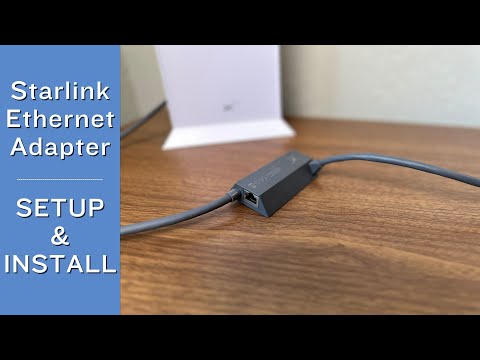
The video above demonstrates how the Starlink Ethernet Adapter allows users to add wired connectivity to compatible Starlink systems. It is especially useful for Gen 2 / Standard Actuated users who want to connect wired devices, network switches, access points, CCTV systems, gaming consoles, or third-party routers.
It also explains important setup considerations such as adapter placement, Ethernet cable connection, router integration, bypass mode, and network testing. These details matter because incorrect wiring or bypass-mode configuration can lead to Wi-Fi loss, no internet, or poor network performance.
For Kenyan users, this video is especially useful for planning Starlink wired networking in homes, offices, lodges, hotels, farms, schools, CCTV systems, and small businesses where stable Ethernet connectivity is essential.
The Starlink Ethernet Adapter is one of the most important accessories for Starlink Gen 2 / Standard Actuated users who need wired networking, third-party router support, CCTV integration, office networking, gaming stability, or access point expansion.
It helps improve:
wired connectivity
router flexibility
CCTV reliability
office network performance
smart TV and gaming stability
access point integration
structured cabling options
third-party router support
For genuine Starlink Ethernet Adapters, compatibility guidance, bypass-mode setup help, office networking, CCTV integration, and nationwide Starlink support, visit Starlite Internet Kenya and let Starlite Internet Kenya help you build a stable wired Starlink network anywhere in Kenya.
Hello! How can we help you today?
Start Chat