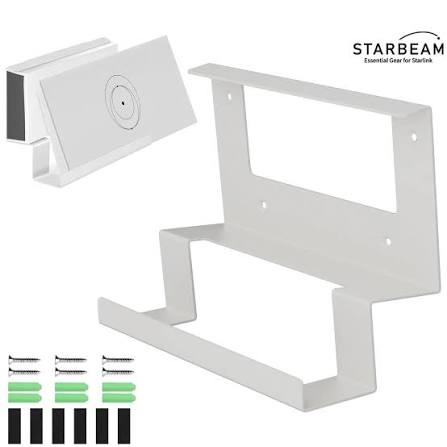
Starlink Gen 3 Router Mount Kenya – Ultra-Detailed Wall Mounting, Space Saving & Router Installation Guide 2026 The Starlink Gen 3 Router Mount is a mounting accessory designed to securely attach the Starlink Gen 3 Router / Mesh Router...
The Starlink Gen 3 Router Mount is a mounting accessory designed to securely attach the Starlink Gen 3 Router / Mesh Router directly onto a wall or flat surface. It helps users save desk space, improve cable organization, protect the router, and create a cleaner Starlink installation in homes, offices, lodges, schools, and commercial environments.
Official Starlink installation documentation confirms that the Gen 3 Router Mount Kit includes:
router mount
wall anchors
mounting screws
installation hardware.
The Router Mount is especially useful for:
homes
apartments
offices
lodges
hotels
schools
server rooms
smart homes
CCTV networking
organized Starlink installations
where users require:
cleaner router placement
cable management
safer mounting
desk space saving
improved organization
easier networking layouts
Several Starlink accessory listings describe the Router Mount as ideal when:
desk space is limited
vertical mounting is preferred
mobility and space efficiency are important.
| Router Mount Type | Estimated Kenya Price | Best Use |
|---|---|---|
| Basic Gen 3 Router Mount | KSh 8,000 – 18,000 | Home installations |
| Official Starlink Gen 3 Router Mount | KSh 20,000 – 45,000 | Professional installations |
| Heavy-Duty Router Wall Mount | KSh 15,000 – 35,000 | Commercial networking |
| Multi-Router Rack Setup | KSh 35,000 – 90,000 | Offices & server rooms |
| Professional Installation Package | KSh 40,000 – 120,000+ | Business deployments |
A Kenyan listing for the official-style Gen 3 Router Mount shows pricing around KSh 45,000, including shipping and handling.
| Component | Basic Home Setup | Office Setup | Lodge / Business Setup |
|---|---|---|---|
| Starlink Standard Kit | KSh 45,000 – 65,000 | KSh 45,000 – 65,000 | KSh 45,000 – 65,000 |
| Gen 3 Router Mount | KSh 15,000 | KSh 30,000 | KSh 45,000 |
| Cable Management | KSh 2,000 – 5,000 | KSh 5,000 – 15,000 | KSh 10,000 – 30,000 |
| Ethernet Integration | Optional | KSh 5,000 – 20,000 | KSh 20,000 – 80,000 |
| Installation Labour | Optional | KSh 5,000 – 20,000 | KSh 20,000 – 60,000 |
| Estimated Total | KSh 62,000 – 85,000 | KSh 90,000 – 155,000 | KSh 140,000 – 280,000+ |
| Problem Without Router Mount | Result | Router Mount Benefit |
|---|---|---|
| Router placed on floor | Dust exposure | Cleaner installation |
| Loose cables | Messy setup | Better cable organization |
| Limited desk space | Clutter | Space saving |
| Router instability | Fall risk | Secure mounting |
| Poor organization | Difficult maintenance | Cleaner networking layout |
| Buyer Type | Suitability |
|---|---|
| Home users | Excellent |
| Offices | Excellent |
| Hotels & lodges | Excellent |
| Smart homes | Excellent |
| Schools | Excellent |
| Server/network rooms | Excellent |
| Temporary outdoor setups | Moderate |
The Starlink Gen 3 Router Mount is ideal for users who want a cleaner, safer, and more professional Starlink networking setup.
| Specification | Details |
|---|---|
| Product Type | Wall-mounted router holder |
| Compatibility | Starlink Gen 3 Router |
| Installation Surface | Wall or flat surface |
| Main Function | Router organization and mounting |
| Cable Retention | Yes |
| Router Snap-In Design | Yes |
| Installation Hardware Included | Yes |
Official installation documentation confirms the Router Mount allows the Gen 3 Router to:
snap into place
retain cables securely
mount directly to a wall or surface.
| Included Component | Purpose |
|---|---|
| Router Mount | Holds router securely |
| Wall Anchors | Supports wall installation |
| Mounting Screws | Secure mounting |
| Installation Hardware | Setup support |
| Feature | Benefit |
|---|---|
| Snap-in router design | Easier installation |
| Compact body | Saves space |
| Cable retention support | Cleaner cable routing |
| Wall mounting support | Better organization |
| Stable router placement | Improved safety |
| Feature | Table Placement | Router Mount |
|---|---|---|
| Space efficiency | Moderate | Excellent |
| Cable management | Messy | Cleaner |
| Router safety | Moderate | Better |
| Professional appearance | Moderate | Excellent |
| Maintenance access | Moderate | Better organized |
| Feature | DIY Shelf | Official Router Mount |
|---|---|---|
| Router fit | Varies | Exact fit |
| Cable retention | Limited | Better |
| Space optimization | Moderate | Excellent |
| Stability | Varies | Better |
| Professional look | Moderate | Better |
The Gen 3 Router Mount is specifically designed for secure, organized, and efficient wall-mounted Starlink router installations.
| Device | Compatibility |
|---|---|
| Starlink Gen 3 Router | Yes |
| Starlink Mesh Router | Yes |
| Gen 2 Router | No |
| Starlink Mini Router | No |
| Third-party routers | Limited |
Official listings specify compatibility with the Starlink Gen 3 Router.
| Environment | Suitability |
|---|---|
| Home networking | Excellent |
| Office networking | Excellent |
| CCTV integration | Excellent |
| Smart home setup | Excellent |
| Hotel Wi-Fi | Excellent |
| Server room organization | Excellent |
| Cable Type | Suitability |
|---|---|
| Power cable | Excellent |
| Ethernet LAN cables | Excellent |
| Mesh networking cables | Excellent |
| Structured cabling | Excellent |
| Smart Home Component | Benefit |
|---|---|
| CCTV systems | Cleaner networking |
| Smart lighting | Better organization |
| Home automation | Easier cable management |
| Mesh networking | Cleaner deployment |
The Gen 3 Router Mount works best in organized networking environments where cable management and router protection are important.
| Step | Action |
|---|---|
| 1 | Choose mounting location |
| 2 | Mark wall anchor points |
| 3 | Drill mounting holes |
| 4 | Install wall anchors |
| 5 | Secure Router Mount |
| 6 | Snap Gen 3 Router into place |
| 7 | Route cables neatly |
| 8 | Test Wi-Fi and networking |
Official installation guides specify:
drilling holes
installing wall anchors
securing the mount
snapping the router into position.
| Tool | Purpose |
|---|---|
| Drill | Mounting holes |
| Marker | Hole marking |
| Phillips screwdriver | Screw installation |
| Drill bits | Anchor installation |
| Level | Straight mounting |
Starlink installation documentation recommends:
drill
marker
2 Phillips screwdriver
4 mm or 7 mm drill bits depending on anchors.
| Placement Area | Recommendation |
|---|---|
| Central wall position | Excellent |
| High wall placement | Good |
| Enclosed cabinet | Avoid |
| Behind TV | Moderate |
| Near thick concrete wall | Avoid |
| Open office area | Excellent |
| Best Practice | Benefit |
|---|---|
| Place centrally | Better Wi-Fi distribution |
| Keep elevated | Better signal spread |
| Avoid enclosed spaces | Better airflow |
| Route cables cleanly | Better maintenance |
| Use proper anchors | Better safety |
| Mistake | Result |
|---|---|
| Mounting near thick walls | Weak signal |
| Loose anchors | Router instability |
| Poor cable routing | Messy installation |
| Enclosed placement | Reduced airflow |
| Low placement | Reduced Wi-Fi coverage |
Proper placement and cable organization are critical for maximizing both Wi-Fi performance and installation cleanliness.
| Environment | Benefit |
|---|---|
| Small apartment | Saves desk space |
| Office desk | Cleaner workstation |
| Network room | Better organization |
| Smart home setup | Cleaner appearance |
| Placement Strategy | Benefit |
|---|---|
| Elevated placement | Better coverage |
| Central placement | Improved range |
| Open environment | Better performance |
| Mesh-compatible setup | Better roaming |
| Cable Management Tool | Purpose |
|---|---|
| Cable clips | Organized routing |
| Cable sleeves | Cleaner appearance |
| Ethernet organizers | Structured networking |
| Velcro ties | Easier maintenance |
| Business Use | Benefit |
|---|---|
| Hotel Wi-Fi | Cleaner networking |
| Office deployment | Better organization |
| CCTV integration | Easier maintenance |
| Smart office | Structured setup |
The Router Mount improves organization, Wi-Fi optimization, and cable management for both residential and commercial Starlink installations.
When buying a Starlink Gen 3 Router Mount, many users underestimate the importance of proper router placement, cable routing, and Wi-Fi planning. Poor router positioning can lead to:
weak Wi-Fi coverage
messy cable routing
poor airflow
networking instability
difficult maintenance
cluttered installations
This is why many customers prefer buying from Starlite Internet Kenya because they help users choose the right mounting and networking setup depending on:
building layout
Wi-Fi coverage needs
office size
cable routing
mesh deployment
smart home requirements
CCTV integration
structured networking needs
Starlite Internet Kenya also helps customers with:
Wi-Fi planning
router placement
cable management
mesh networking
office networking
smart home integration
CCTV deployment
nationwide Starlink support
This is especially important in:
offices
homes
lodges
hotels
apartments
schools
smart homes
commercial buildings
where proper networking organization directly affects Wi-Fi quality and maintenance efficiency.
It is a wall mounting accessory designed to securely hold the Starlink Gen 3 Router.
Yes. Official listings specify compatibility with the Starlink Gen 3 Router.
Yes. The mount is designed so the router snaps securely into position.
Yes. Cable retention features help prevent accidental cable pull-outs.
Yes. It is ideal for organized office networking and space saving.
Indirectly, yes. Better router placement can improve Wi-Fi coverage.
A drill, screwdriver, marker, and drill bits are commonly recommended.
Yes. It helps create cleaner and more organized smart home networking setups.
Yes. It works well in mesh router deployments.
Depending on supplier and package, prices may range from about KSh 15,000 – 45,000+.
Yes. It is designed for wall or flat-surface mounting.
From Starlite Internet Kenya for genuine Starlink accessories, installation guidance, and nationwide support.
The video above demonstrates how the Starlink Gen 3 Router Mount helps users create a cleaner, safer, and more organized Starlink networking installation. It shows why wall mounting is useful for reducing clutter, improving cable management, and saving desk space.
It also explains important setup considerations such as wall positioning, cable routing, router airflow, Wi-Fi optimization, and structured networking organization. These details matter because router placement directly affects wireless coverage, maintenance convenience, and installation quality.
For Kenyan users, the video is especially useful for planning Starlink networking installations in homes, apartments, offices, lodges, hotels, schools, smart homes, and commercial environments where organized Wi-Fi deployment is essential.
The Starlink Gen 3 Router Mount is one of the best accessories for users who want a cleaner, safer, and more professional Starlink networking setup.
It helps improve:
router organization
cable management
Wi-Fi placement
desk space efficiency
networking maintenance
smart home integration
office organization
professional installation quality
for homes, offices, lodges, hotels, schools, and commercial environments across Kenya.
For genuine Starlink Gen 3 Router Mounts, Wi-Fi planning, cable management support, structured networking guidance, smart home integration, and nationwide Starlink support, visit Starlite Internet Kenya and let Starlite Internet Kenya help you build a cleaner and more reliable Starlink networking setup anywhere in Kenya.
Hello! How can we help you today?
Start Chat