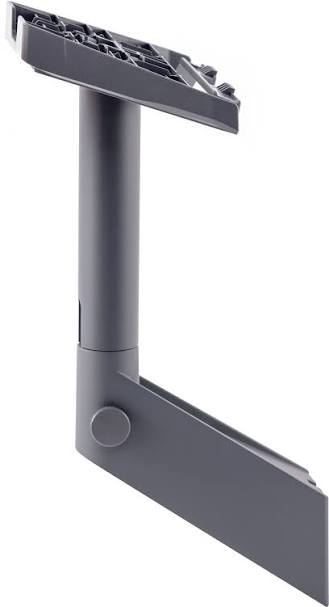
Starlink Standard Wall Mount Kenya – Ultra-Detailed Rooftop, Fascia & Outdoor Installation Guide 2026 The Starlink Standard Wall Mount is one of the best mounting accessories for installing the Starlink Standard Gen 3 / Standard 4X dish on exterior...
The Starlink Standard Wall Mount is one of the best mounting accessories for installing the Starlink Standard Gen 3 / Standard 4X dish on exterior walls, fascia boards, gable ends, and elevated building structures. It helps position the Starlink dish above obstructions, away from ground-level risks, and closer to a clear view of the sky.
Official Starlink documentation states that the Standard Wall Mount is designed for exterior wall installation near the top of a gable or fascia and supports a maximum 4-inch overhang. The official kit includes the wall mount, silicone, 2 lag screws, and 20 cable routing clips.
The Starlink Standard Wall Mount is ideal for:
Homes and apartments
Offices and shops
Farms and rural compounds
Lodges and hotels
Schools and clinics
Construction sites
Remote field offices
Permanent rooftop-facing installations
| Wall Mount Type | Estimated Kenya Price | Best Use |
|---|---|---|
| Basic Standard Wall Mount | KSh 6,000 – 10,000 | Simple home installations |
| Gen 3 / Standard 4X Wall Mount | KSh 7,999 – 15,000 | Standard residential setups |
| Heavy-Duty Wall Mount | KSh 15,000 – 25,000 | Windy or exposed areas |
| Wall Mount + Cable Routing Kit | KSh 18,000 – 35,000 | Cleaner permanent installations |
| Professional Installation Package | KSh 30,000 – 100,000+ | Homes, offices, lodges, farms |
Kenyan listings show Starlink Gen 3 wall mounts around KSh 7,999, while some wall mount listings range around KSh 6,699 – KSh 20,000, depending on supplier, design, and installation support.
| Component | Basic Home Setup | Farm / Rural Setup | Lodge / Office Setup |
|---|---|---|---|
| Starlink Standard Kit | KSh 45,000 – 65,000 | KSh 45,000 – 65,000 | KSh 45,000 – 65,000 |
| Standard Wall Mount | KSh 8,000 | KSh 15,000 | KSh 20,000 |
| Cable Clips / Conduit | KSh 2,000 – 6,000 | KSh 5,000 – 15,000 | KSh 10,000 – 30,000 |
| Installation Labour | KSh 8,000 – 20,000 | KSh 15,000 – 35,000 | KSh 25,000 – 70,000 |
| Sealant / Waterproofing | KSh 1,000 – 3,000 | KSh 2,000 – 5,000 | KSh 3,000 – 8,000 |
| Estimated Total | KSh 64,000 – 102,000 | KSh 82,000 – 140,000 | KSh 103,000 – 193,000+ |
| Problem Without Wall Mount | Result | Wall Mount Benefit |
|---|---|---|
| Ground-level placement | More obstruction risk | Elevated dish position |
| Temporary kickstand setup | Unstable long-term use | Permanent installation |
| Poor cable routing | Cable strain and damage | Cleaner cable path |
| Dish near trees or walls | More interruptions | Better placement flexibility |
| Exposed equipment | Higher damage risk | Safer mounting |
The Starlink Standard Wall Mount is a strong long-term investment for users who want a stable, clean, and professional Starlink installation.
| Specification | Details |
|---|---|
| Product Type | Exterior wall / fascia mount |
| Compatibility | Starlink Standard / Standard Gen 3 / Standard 4X |
| Overhang Support | Up to 4 inches |
| Installation Surface | Exterior wall, gable, fascia |
| Package Dimensions | 280 × 470 × 105 mm |
| Package Weight | 1.6 kg |
| Installation Difficulty | Medium |
| Drilling Required | Yes |
Official Starlink accessory documentation lists the Standard Wall Mount package weight as 1.6 kg and package dimensions as 280 × 470 × 105 mm.
| Included Component | Purpose |
|---|---|
| Wall Mount | Main structural support |
| Silicone | Waterproof sealing |
| 2 Lag Screws | Strong wall fastening |
| 20 Cable Routing Clips | Cable organization |
| Tool | Purpose |
|---|---|
| Drill | Pilot holes |
| 6 mm / 1⁄4 inch drill bit | Official pilot hole size |
| 9/16 inch hex socket | Tightening lag screws |
| Marker | Hole marking |
| Level | Straight installation |
| Starlink app | Obstruction check |
Starlink’s official guide recommends drilling pilot holes using a 6 mm / 1⁄4 inch drill bit, applying silicone inside and over the holes, and routing the cable through the mast before installing the dish.
| Starlink System | Compatibility |
|---|---|
| Starlink Standard Gen 3 | Yes |
| Starlink Standard 4X / V4 | Yes |
| Starlink Standard | Yes |
| Starlink Enterprise | Listed as compatible in Standard accessories guide |
| Starlink Mini | No |
| Starlink Standard Actuated Gen 2 | Different mount ecosystem |
| Flat High Performance | No |
| Feature | Standard Wall Mount | Long Wall Mount |
|---|---|---|
| Best use | Standard fascia/gable setups | Larger roof overhangs |
| Overhang support | Up to 4 inches | Larger clearance needs |
| Installation difficulty | Medium | Medium |
| Drilling required | Yes | Yes |
| Best buyer | Most homes/offices | Deep eaves and overhangs |
The Standard Wall Mount is best for exterior wall and fascia installations where the overhang does not exceed the supported clearance.
| Surface Type | Suitability |
|---|---|
| Exterior wall | Excellent |
| Fascia board | Excellent |
| Gable end | Excellent |
| Timber structure | Good if strong |
| Concrete wall | Good with correct anchors |
| Metal structure | Good with proper fastening |
| Weak thin board | Not recommended |
| Environment | Suitability |
|---|---|
| Nairobi homes | Excellent |
| Rural farms | Excellent |
| Lodges and hotels | Excellent |
| Coastal properties | Good with corrosion care |
| Construction sites | Excellent |
| Schools and clinics | Excellent |
| Remote offices | Excellent |
| Obstruction | Wall Mount Solution |
|---|---|
| Trees | Install higher on gable/fascia |
| Nearby wall | Choose open-facing side |
| Roof overhang | Confirm 4-inch clearance |
| Water tank | Install away from blockage |
| Adjacent building | Move to clearer side |
The Wall Mount works best when installed on a strong exterior surface with a clear view of the sky and enough clearance from overhangs.
| Step | Action |
|---|---|
| 1 | Use Starlink app to check for obstructions |
| 2 | Select a strong exterior wall, fascia, or gable location |
| 3 | Confirm overhang clearance |
| 4 | Mark pilot holes |
| 5 | Drill holes using 6 mm / 1⁄4 inch drill bit |
| 6 | Apply silicone sealant |
| 7 | Screw wall mount into place |
| 8 | Insert mast base until it clicks |
| 9 | Route cable through mast |
| 10 | Plug cable into Starlink |
| 11 | Install dish onto mount |
| 12 | Run alignment and speed tests |
| Best Practice | Benefit |
|---|---|
| Install into structural support | Better long-term stability |
| Use the Starlink app first | Better obstruction avoidance |
| Apply silicone properly | Reduces water ingress risk |
| Avoid sharp cable bends | Longer cable lifespan |
| Use cable clips | Cleaner routing |
| Inspect after storms | Maintains safety |
| Mistake | Result |
|---|---|
| Mounting on weak fascia | Instability |
| Skipping silicone | Water leakage risk |
| Poor cable routing | Cable damage |
| Installing near trees | Signal interruptions |
| Loose lag screws | Dish movement |
| Ignoring obstruction check | Poor performance |
A proper Standard Wall Mount installation must combine structural strength, waterproofing, clean cable routing, and clear sky visibility.
| Weather Condition | Suitability |
|---|---|
| Heavy rain | Good with sealing |
| Strong sun | Excellent |
| Wind | Good with proper fastening |
| Dust | Excellent |
| Coastal humidity | Good with maintenance |
| Stormy areas | Professional installation recommended |
Starlink describes the wall mount as made from durable, weather-resistant materials for outdoor installation.
| Cable Risk | Prevention |
|---|---|
| Sharp roof edge | Use cable clips or conduit |
| Cable pulling | Leave controlled slack |
| Water entry | Seal entry point |
| Foot traffic | Route away from walking paths |
| UV exposure | Use protected routing where possible |
| Maintenance Action | Frequency |
|---|---|
| Check lag screw tightness | Every few months |
| Inspect cable route | Monthly |
| Check silicone/sealant | After heavy rain |
| Run obstruction test | After roof or tree changes |
| Clean around mount | As needed |
Long-term Starlink reliability depends on a stable mount, protected cable route, and properly sealed installation points.
| Mount Type | Best Use |
|---|---|
| Wall Mount | Exterior walls, fascia and gables |
| Pivot Mount | Sloped roofs and angled surfaces |
| X-Frame Base | Portable ground setup |
| Pipe Adapter | Pole installations |
| Roof Rack Mount | Vehicle roof racks |
| Mobility Mount | Permanent mobile vehicle setups |
| Feature | Wall Mount | Pivot Mount |
|---|---|---|
| Best use | Exterior wall/fascia | Sloped roof |
| Angle adjustment | Limited | Better |
| Permanent installation | Yes | Yes |
| Cable routing | Excellent | Good |
| Best for homes/offices | Excellent | Excellent |
| Feature | Wall Mount | X-Frame Base |
|---|---|---|
| Permanent installation | Better | |
| Portability | Low | |
| Ground setup | No | |
| Wind stability | Better | |
| Camping use | Not ideal | |
| Professional appearance | Better |
The Standard Wall Mount is the right choice for fixed building installations where long-term stability and clean cable routing matter.
When buying a Starlink Standard Wall Mount, the biggest mistake many users make is buying the mount without checking whether it fits their wall, fascia, roof overhang, cable route, and obstruction situation. A wrong installation can lead to unstable mounting, water leaks, cable damage, poor signal, and repeated service interruptions.
This is why buying from Starlite Internet Kenya is a better choice. Starlite helps customers choose the right mounting accessory based on building design, overhang clearance, roof height, wall strength, nearby trees, cable distance, and long-term installation needs.
Starlite Internet Kenya also supports customers with obstruction checks, wall mounting guidance, rooftop installation planning, cable routing advice, waterproofing recommendations, router placement, Wi-Fi planning, and nationwide Starlink support. These services are especially valuable for Kenyan homes, farms, lodges, offices, schools, clinics, and rural compounds where proper placement can significantly improve performance.
For customers who want reliable Starlink internet, Starlite Internet Kenya provides practical local experience to help install the system safely, cleanly, and professionally in real Kenyan conditions.
It is an exterior mounting accessory used to install the Starlink Standard Gen 3 / Standard 4X dish on a wall, fascia, or gable.
Yes. Starlink’s Standard accessories guide lists the wall mount for Standard Starlink systems.
The Standard Wall Mount supports a 4-inch maximum overhang.
The kit includes the wall mount, silicone, 2 lag screws, and 20 cable routing clips.
Yes. The official guide instructs users to drill pilot holes using a 6 mm / 1⁄4 inch drill bit.
Yes. Starlink’s guide recommends applying silicone inside and over the holes before screwing in the mount.
Yes, where exterior mounting is allowed and the dish has a clear sky view.
Yes. The wall mount is better for permanent outdoor installations.
No. Starlink Mini uses different Mini-specific mounts.
Common prices range from about KSh 6,699 to KSh 20,000, depending on seller and package.
Yes, especially for high walls, fascia boards, rooftops, offices, lodges, and commercial sites.
From Starlite Internet Kenya for genuine accessories, installation guidance, cable routing support, and nationwide Starlink assistance.

The video above demonstrates how the Starlink Standard Wall Mount helps users install the dish securely on exterior walls, gables, and fascia boards. It shows why proper positioning, strong fastening, and clear sky visibility are essential for strong Starlink performance.
It also highlights important setup considerations such as selecting the right wall location, checking for obstructions, drilling pilot holes, applying silicone, securing the mount, routing the cable, and installing the dish properly. These details matter because poor installation can lead to water leaks, cable damage, dish movement, and unreliable connectivity.
For Kenyan users, this video is especially useful for planning Starlink Standard installations in homes, apartments, lodges, farms, schools, clinics, offices, and rural compounds where wall mounting offers a clean and reliable permanent setup.
The Starlink Standard Wall Mount is one of the best accessories for users who want a strong, clean, and permanent installation for the Starlink Standard Gen 3 / Standard 4X dish.
It improves:
installation stability
wall and fascia mounting
cable routing
obstruction management
outdoor durability
installation safety
long-term Starlink reliability
For genuine Starlink Standard Wall Mounts, wall installation guidance, obstruction checks, waterproofing advice, cable routing support, and nationwide Starlink setup assistance, visit Starlite Internet Kenya and let Starlite Internet Kenya help you build a reliable Starlink installation anywhere in Kenya.
Hello! How can we help you today?
Start Chat